Plant a Tree
Final step in planting a new tree is a few clicks on Forestree to get it logged.
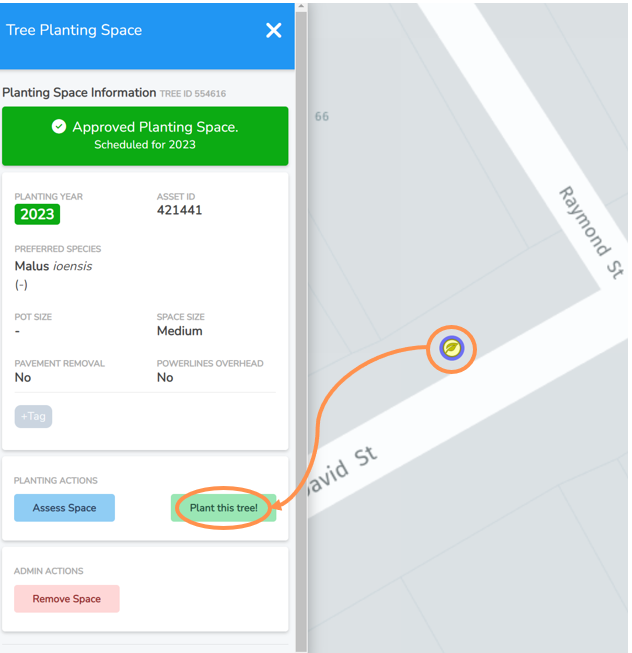
• Navigate to the planting location asset on the Planting Map view.
• Select the tree leaf icon maker and the menu to the left will expand.
• Double check you have the right location and species planted matches.
• Under Work Actions, select the Plant this tree! button.
-
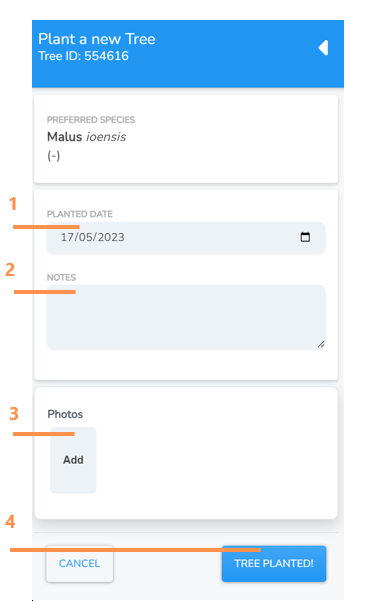
The Planted Date will pre-fill with todays date, but you can edit it if you are catching up on records.
2. Enter any notes if applicable.
3. Click “Add” and you will be taken to a browse screen to select and import a photo from your computer or device. NOTE: Always a good idea to do this with new plantings. Many Councils require it as evidence of works completed.
4. Select Tree Planted! and this will save and close the screen. Your tree planting location is now registered as a new tree asset.