
Watering Analyser
Use the Water Analyser to review and filter completed watering activity data. Navigate to this section by selecting the Watering Analyser tab on the Reporting page.
If you are diligent with your data entry, you can use this tool to answer questions such as:
• How many trees were watered by “who” last month? – Does it match this invoice?
• How many trees were watered today?
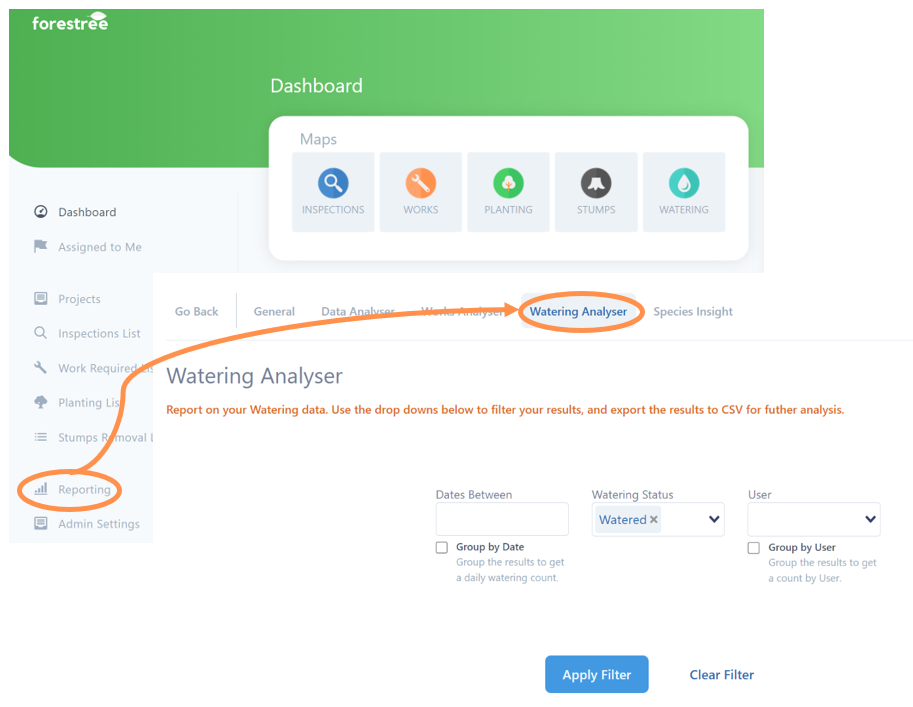
You can filter the watering dataset by a range of attributes. You can filter by one or more categories.
Select as many as you like from the drop down boxes in one or more of the following categories:
1. Dates Between (you will be provided with calendar drop downs to select a start and end date of your search timeframe)
2. Watering Status (default is for watered to be pre-selected, but this can be changed to no watered required)
3. User (filter to one or more staff or contractors)
4. Once happy with your filter(s), select the Apply Filter button which will then filter the results.
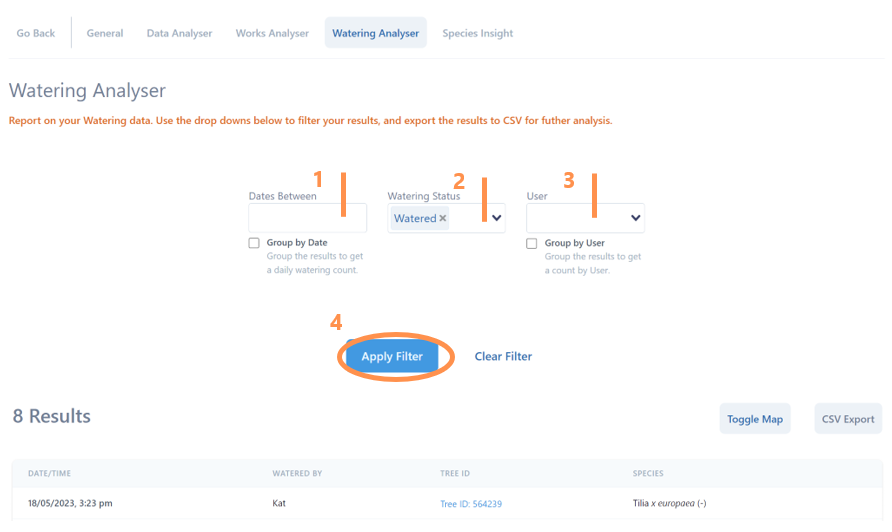
Depending on your reporting needs, you may be happy with the tally number of results, or you have options to export a CSV file and/or select on any of the Tree ID numbers to see more detail.
You also have the option to Toggle Map to view the results spatially. From the embedded map you can Draw an Area to filter results. Please refer to how to draw area from the Data Analyser section.