
Creating a Volunteer Form
Navigate to Admin Settings > Attributes > Forms > New Form
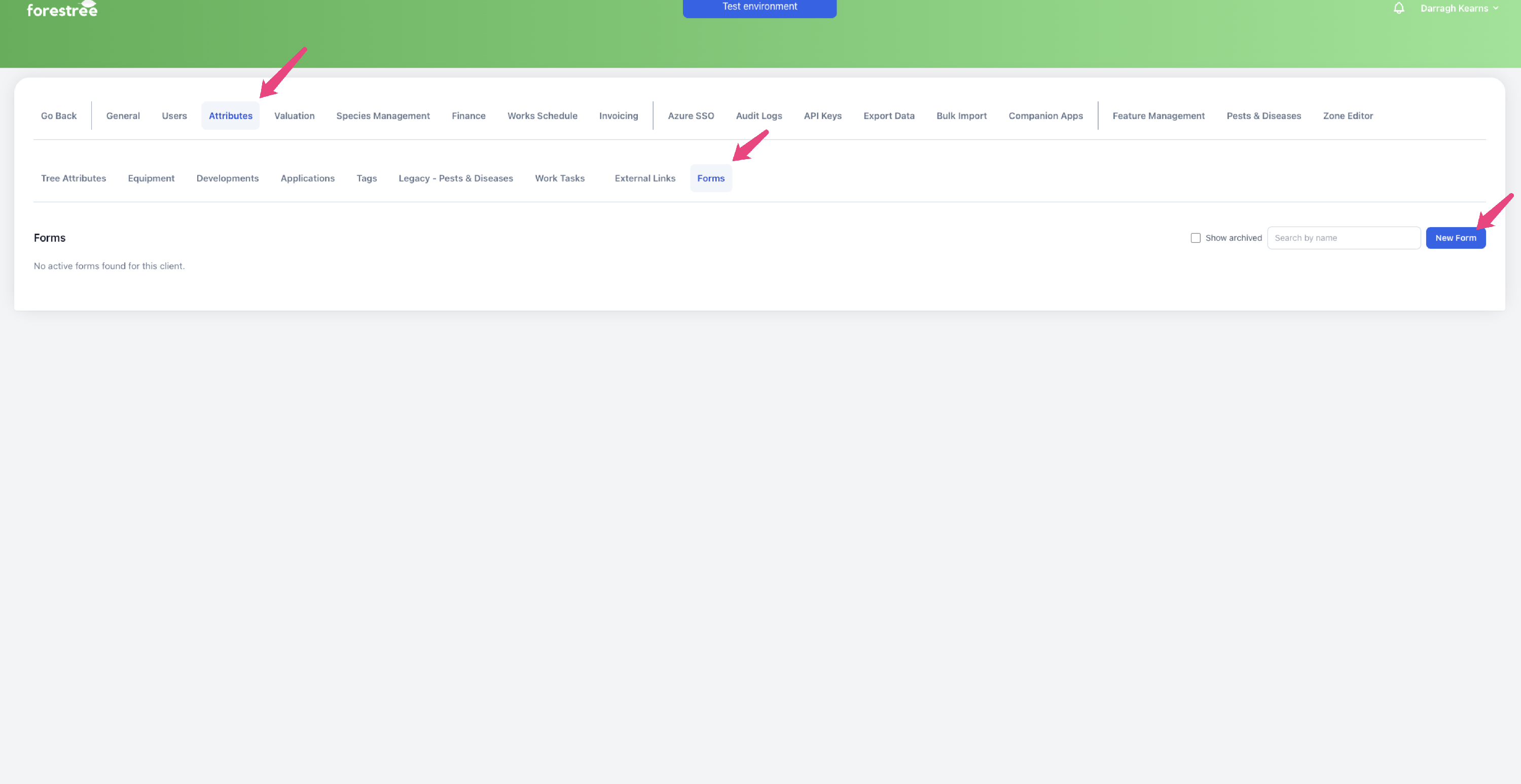
Fill out the form with the fields that you would like the volunteer to collect.
There are 2 types of Forms
- Inspection: For Pest and Disease and Tree attributes and other data collection
- Works: For Volunteer to undertake works , types of works can be specified on the forms)
Field type description
Pest disease ( Inspection form only)
See Creating a pest disease volunteer form
Single select
Single option select, to be shown in the volunteer inspection item in tree history. Enter the options that the volunteer can select from.
Multi select
Multiple option select, to be shown in the volunteer inspection item in tree history. Enter the options that the volunteer can select from.
Notes
Free text notes field, to be shown in the volunteer inspection item in tree history.
Photos
Allow volunteers to upload photos. You can specify a maximum number of photos they can upload per submission.
Work tasks ( Works form only)
These are work tasks that the volunteer can complete. When they are present, when the volunteer submits the form, they will indicate which work tasks they have completed on that tree.
Tree attribute (Inspection form only)
Allow volunteers to collect data to directly update tree attributes. This is able to be rolled back on a per volunteer basis.
The attributes you can select from are:
- ULE
- Health
- Age
- Structure
- Height
- Canopy size
- DBH
- Circumference
- Retention value